


Black Box Traffic Recorder
10000+ Happy Customers!
 ORDER ON WHATSAPP
Flash Sale Starts Now
20% off selected items with code: FLASH20
Lifetime Guarantee
Highest Quality
Material
Free & Fast
Shipping

Black Box Traffic Recorder
64 GB Memory Card Maximum Storage Capacity Supported. Already Installed in dash cam Loop Recording: Continuous loop recording will automatically overwrite the old footage, so you don't need to worry about your memory card running out of space.
G-Sensor: Combined with G-Sensor, the dash cam front and insode will lock the footage to prevent the video from being overwritten when detects a sudden shake/collision
Seemless Video, 170 Degree Wide Angle, Night Vision, 110 Degree Rotatable, Waterproof, FUll Color, Park Mode
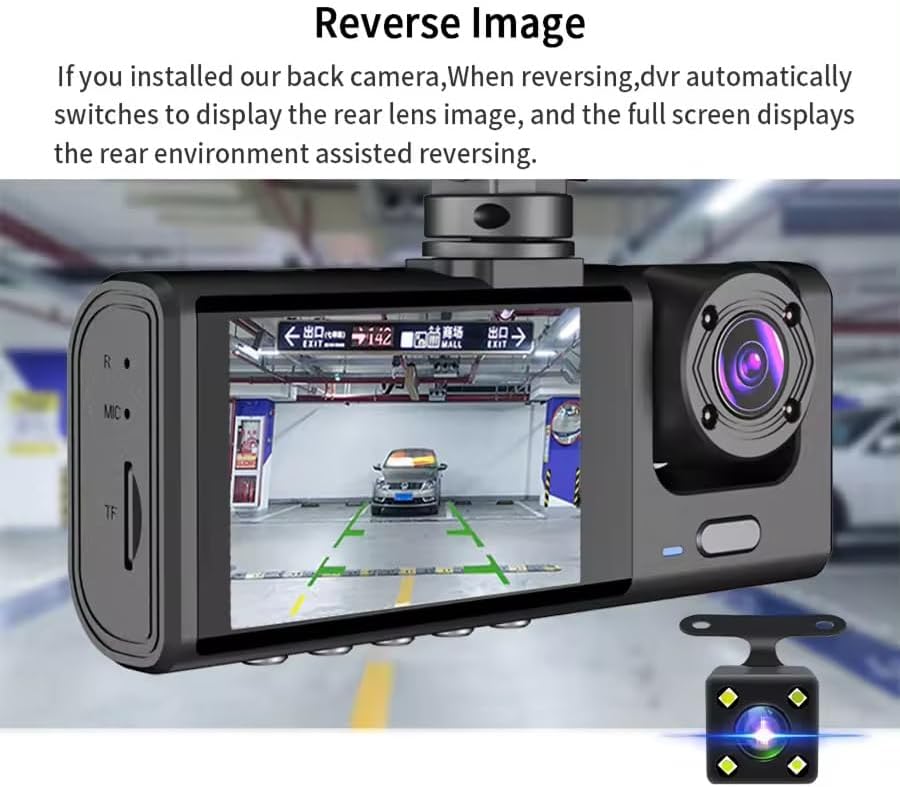
Reverse Image: If you install our back camera DVR automatically switches to display the rear lens image while reversing the vehicle.
1080P Dash Cam Front and Rear Inside with HD Display: 3 Channel Videos are displayed on the IPS screen giving you live time video feedback of 3 sides of your car.
Auto Save the Collision Footage and Loop Recording: Built in Gravity-Shock Sensor, then the dash cam detects a collision or bump happens, the sensor will auto-lock the footage as evidence(protected files).
Evidence for collisions, theft, and vicious scratch happening after your car is parked. Parking Monitor: When the dash cam detects a collision happens, it will auto power on then record a protected video (doesn’t need a hardwire kit). 24 Hours recording: the dashcam will go on recording after your car is parked.
1. Introduction
Thank you for choosing the Generic Black Box Traffic Recorder Dash Cam. This device is designed to provide comprehensive vehicle surveillance with its three-channel recording system, capturing footage from the front, inside, and rear of your vehicle. Equipped with advanced features like G-Sensor, Loop Recording, and 24-hour Parking Monitor, it ensures your driving and parked vehicle are protected. Please read this manual carefully before use to ensure proper installation and operation.

Image: The main dash cam unit with its adjustable suction cup mount, showing the front camera and display screen.
2. Package Contents
Please verify that all items listed below are included in your package:
- 1x 1080P Dual Dash Cam (Main Unit)
- 1x User Manual
- 1x Car Charger
- 1x Video Cable (for rear camera)
- 1x Rear Camera
- 1x Suction Cup Holder
- 1x 64 GB Memory Card (pre-installed)
- 2x Screws (for rear camera mounting)
- 1x Viscose (adhesive for rear camera)
 Image: A visual representation of all items included in the product package
3. Product Overview and Components
Familiarize yourself with the main components of your dash cam system:
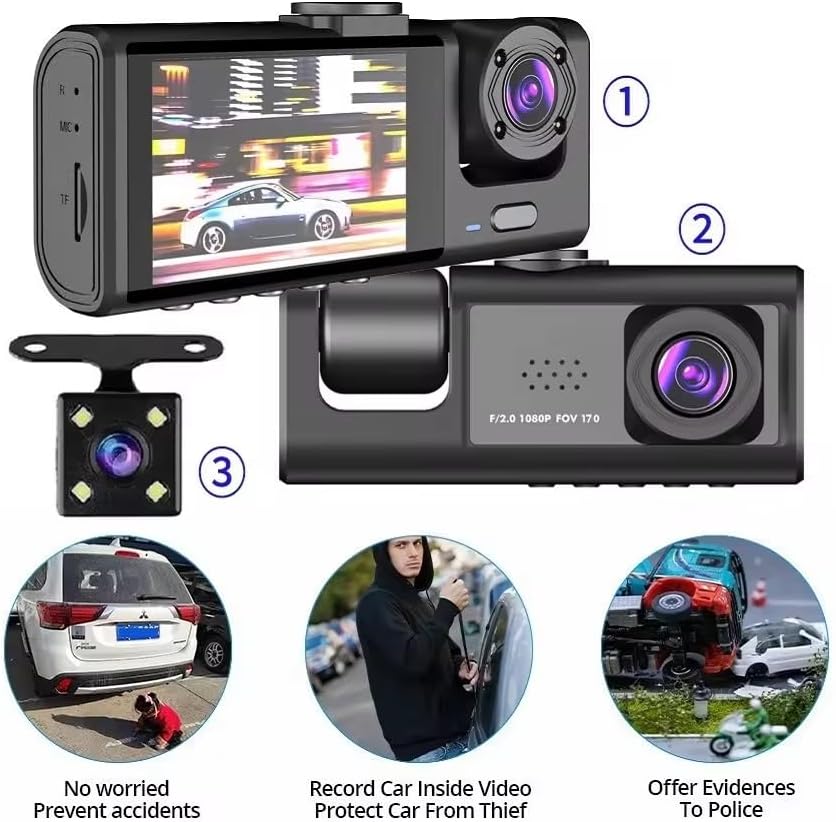
- Front Camera: Captures the road ahead (170° FOV).
- Inside Camera: Records the vehicle's interior (120° FOV, 110° rotatable).
- Display Screen: 2-inch LCD for live view and menu navigation.
- Control Buttons: For menu, mode, up, down, and OK functions.
- MicroSD Card Slot: For memory card insertion.
- Power Port: For connecting the car charger.
Rear Camera:
- Captures the view behind your vehicle.
- Connects to the main unit via the provided video cable.
4. Setup and Installation
4.1. Inserting the Memory Card
The 64 GB memory card is pre-installed. If you need to remove or re-insert it, ensure the dash cam is powered off. Gently push the card into the MicroSD card slot until it clicks into place. To remove, push it again until it springs out.
4.2. Mounting the Main Unit
- Clean the windshield area where you intend to mount the dash cam.
- Attach the suction cup holder to the main dash cam unit.
- Press the suction cup firmly against the windshield and flip the lever to secure it.
- Adjust the angle of the dash cam to ensure a clear view of the road ahead and the vehicle interior.
4.3. Connecting Power
- Plug the car charger into your vehicle's cigarette lighter socket.
- Connect the other end of the charging cable to the power port on the dash cam.
- Route the cable neatly along the windshield trim to avoid obstructing your view.
4.4. Installing the Rear Camera
The rear camera can be installed inside the rear window or externally near the license plate. For simplified installation, it can be connected directly to the front lens without needing to remove the reversing light.
- Choose a suitable location for the rear camera, ensuring a clear view.
- Secure the rear camera using the provided screws or adhesive (viscose).
- Connect the rear camera cable to the designated port on the main dash cam unit.
- Route the cable discreetly from the rear of the vehicle to the front unit.
5. Operating Instructions
5.1. Power On/Off
The dash cam will automatically power on and begin recording when your vehicle's ignition is turned on (and power is supplied to the cigarette lighter socket). It will automatically power off when the ignition is turned off.
5.2. Recording Modes
The dash cam supports continuous loop recording, G-Sensor activated recording, and parking monitor recording.
5.3. Loop Recording
Continuous loop recording automatically overwrites the oldest footage when the memory card is full. This ensures that the dash cam is always recording without manual intervention. Video segments are typically recorded in 1, 3, or 5-minute intervals.
5.4. G-Sensor (Gravity Sensor)
The built-in G-Sensor detects sudden shakes or collisions. When an impact is detected, the dash cam automatically locks the current video footage, preventing it from being overwritten by loop recording. These protected files serve as crucial evidence in case of an accident.

Image: The G-Sensor automatically protects video files from being overwritten when a sudden impact is detected.
5.5. Parking Monitor (24H Surveillance)
When enabled, the parking monitor feature allows the dash cam to continue monitoring your vehicle even when parked. If a collision or bump is detected, the dash cam will automatically power on and record a protected video. This feature does not require a hardwire kit for basic functionality.
5.6. Reverse Image Function
If the rear camera is installed, the DVR automatically switches to display the rear lens image on the screen when your vehicle is put into reverse. This provides a full-screen view of the rear environment, assisting with parking and reversing maneuvers.

Image: The dash cam display automatically shows the rear camera view when reversing.
6. Advanced Features
6.1. Three-Channel Recording
This dash cam offers simultaneous recording from three perspectives
- Front: Captures the road ahead (170° wide angle).
- Inside: Records the vehicle's interior (120° wide angle).
- Rear: Monitors the view behind the vehicle.
All three channels are displayed on the IPS screen, providing live video feedback.
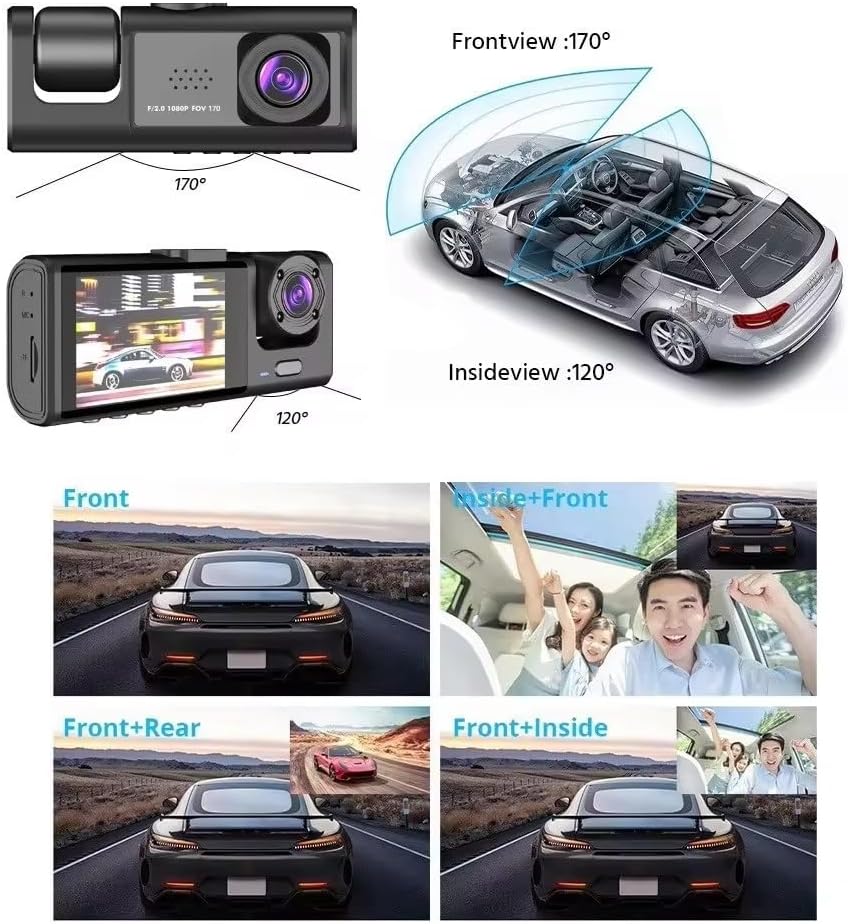
Image: Visual representation of the wide-angle views from the front and inside cameras, and how the multi-channel views are displayed.
6.2. Night Vision
The dash cam is equipped with night vision capabilities to ensure clear video recording even in low-light conditions, enhancing visibility and safety during nighttime driving.
7. Maintenance
7.1. Memory Card Management
To ensure optimal performance and prevent data corruption, it is recommended to format the memory card regularly (e.g., once a month). This can typically be done through the dash cam's menu settings. Always back up important footage before formatting.
7.2. Cleaning the Device
Use a soft, dry cloth to clean the dash cam's lenses and screen. Avoid using abrasive cleaners or solvents, as they may damage the surfaces. Keep the device free from dust and moisture.
8. Troubleshooting
| Problem | Possible Cause | Solution |
|---|---|---|
| Dash cam does not power on. | No power from car charger; faulty cable; loose connection. | Check car charger connection and vehicle's cigarette lighter socket. Try a different USB cable or car charger if available. Ensure vehicle ignition is on. |
| Recording stops or freezes. | Memory card full; faulty memory card; low power. | Format the memory card. Replace the memory card with a high-quality Class 10 or U3 card. Ensure stable power supply. |
| Video quality is poor. | Dirty lens; protective film still on lens; incorrect resolution settings. | Clean the camera lenses. Remove any protective film. Check video resolution settings in the menu. |
| Dash cam restarts frequently. | Unstable power supply; faulty memory card. | Ensure stable power connection. Try a different memory card. |
| Rear camera not displaying. | Loose connection; faulty cable or camera. | Check the connection of the rear camera cable to the main unit. Ensure the cable is not damaged. |
9. Specifications
| Feature | Detail |
|---|---|
| Brand | Generic |
| Model Name | Black Box Traffic Recorder Dash Cam For Vehicle |
| ASIN | B0CZNKZJ55 |
| Video Capture Resolution | 1080p |
| Display Type | LCD |
| Standing Screen Display Size | 2 Inches |
| Actual Viewing Angle (Front) | 170 Degrees |
| Actual Viewing Angle (Inside) | 120 Degrees |
| Flash Memory Type | SD (64 GB included) |
| Special Features | Loop Recording, Night Vision, G-Sensor, 24H Parking Monitor, Reverse Image |
| Mounting Type | Dashboard Mount (Suction Clip) |
| Compatible Devices | Car, Truck, Motorcycle, Minivan, Bus, RV |
| Product Dimensions | 4 x 10.5 x 4.5 cm; 560 g |
| Manufacturer | Shenzhen Harrison Industry Co., Ltd. |
10. Warranty and Support
For any questions, technical support, or warranty inquiries regarding your Generic Black Box Traffic Recorder Dash Cam, please contact the seller or manufacturer directly through the platform where the product was purchased. Please refer to your purchase records for specific contact information.
🚚 Shipping Information
- Free Shipping on all orders.
- No Extra Delivery Charges – You only pay the product price.
- Cash on Delivery (COD) available.
- Your parcel will be delivered within 2–3 business days.